
Now you have created your animation you need to produce some evidence of what you have done.

Open a new Word document and save as ANIMATION EVIDENCE in your ANIMATION folder.

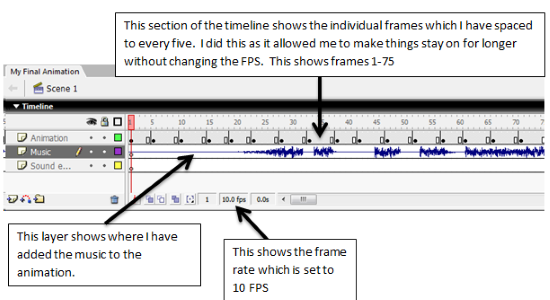
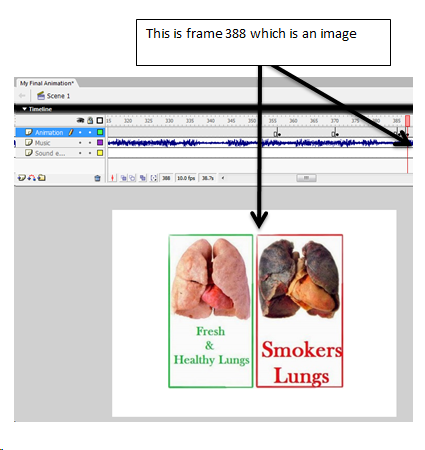
Screen shot and snip your evidence using your flash document. Paste the screen shot into Word and annotate. As a minimum you need to evidence the following:

  • The music
  • The sound effect
  • The frame rate
  • The length of the animation
  • Word cloud
  • Text (information)
  • Character(s)
  • Other images (if used)

Some of the screen shots could be of the TIMELINE section, some could be of the STAGE showing what is on specific frames

Sample of evidence using TIMELINE
Sample of evidence using STAGE/FULL FRAME
To achieve the criteria covered by this task, you must show that you are able to:

  • Prepare assets for the animation product, demonstrating awareness of purpose, with sources of assets listed. 2C.P4
  • Prepare assets for the animation product demonstrating awareness of audience with all sources of assets fully referenced. 2C.M3
  • Refine assets to create a high-quality animation product.* 2C.D3
  • Edit assets to create an animation of at least 30 seconds which includes audio.* 2C.P5
    Test the product for functionality and purpose against the original requirements, making any necessary improvements to the product.
  • Gather feedback from others on the quality of the product and use it to
    improve the product, demonstrating awareness of audience and purpose.* 2C.M4

If you have not achieved the Level 2 criteria, your work will be assessed to determine if the following Level 1 criteria have been met. To achieve the Level 1 criteria, you must show that you are able to:

  • Prepare assets for the animation, with guidance. 1C.4
  • Edit assets to create an animation product of at least 20 seconds, testing the product for functionality with guidance.* 1C.5